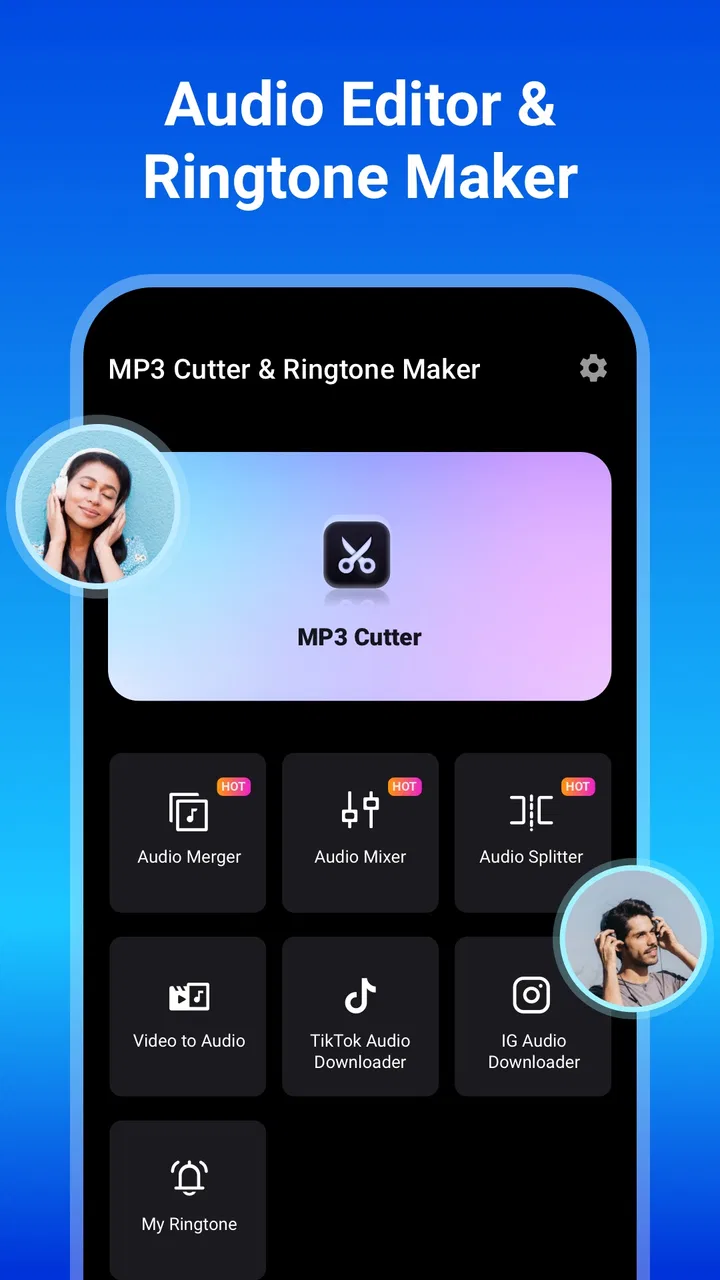
MP3 Cutter and Ringtone Maker
- 4.7
- Rating
- 50.00M
- Installs
- Free
- Price

 Analysis by App-foxy
When I want a ringtone, alarm sound, or notification that feels personal, I usually do not need a full music-production studio. I need to find the right moment in an audio file, trim it without fuss, and turn that short section into something usable on my phone. MP3 Cutter and Ringtone Maker is built around that simple creative starting point, and after using it, I see why it has become such a familiar choice in Music & Audio.
The app comes from InShot Inc. and is free to install, with optional in-app purchases ranging from $3.99 to $15.49 per item. Its purpose is narrow but practical: take an audio file, cut the part you want, and prepare it as a ringtone, alarm, or notification. It is not trying to replace a multitrack editor. That focus is its main strength, although it also explains why people looking for deeper sound design may outgrow it quickly.
From a song or recording to a usable phone sound
The first thing I appreciate is how clearly the app fits an everyday problem. Perhaps there is a memorable chorus buried in a long track, a quiet section that would work better as an alarm, or a short spoken recording that should alert you to a particular task. Instead of opening a desktop editor or learning a complicated mobile workstation, I can approach the job as a simple selection exercise: choose the source, locate the useful part, and remove everything else.
You May Also Like

 Blood Strike: 2.5 Anniversary
Blood Strike’s Loadouts Turn Every Drop Into a Tactical Gamble
A close look at Blood Strike’s custom loadouts: how fast access to signature weapons reshapes its battle royale rhythm, rewards preparation, and narrows the gap between fights.

 Pandora - Music & Podcasts
Pandora’s Music Is Easy to Start, but Harder to Recover
Pandora’s strength is its low-effort path from a seed to a station. Its weak spot is how much confidence it asks you to place in connection, setup, and quiet recovery.

 8 Ball Pool
 Is Built on Rivalries, Rematches, and Routine
A close look at the rivalries, rematches, shared routines, and unanswered safety questions that turn a quick pool match into a persistent mobile community.

 Samsung Music
’s Quiet Strength Is Playing What You Already Own
Its reach comes less from spectacle than from dependable access to a personal library. That simplicity is both the app’s strongest retention engine and its ceiling.

 AccuWeather: Weather Radar
AccuWeather Review: A Quick, Clear Forecast for Everyday Decisions
For everyday plans, the best forecast is the one you can understand quickly. AccuWeather makes rain timing, radar, and local conditions easy to act on, with a few trade-offs.

 Hill Climb Racing
Why Hill Climb Racing Still Turns Crashes Into One More Run
A tiny car, a bumpy hill and one more upgrade: Hill Climb Racing keeps resurfacing because its simple chaos makes every near-miss feel personal.
More From Our News Desk
View All News


That makes it especially approachable for people who have never edited audio before. The store describes it as an MP3 cutter, but the practical idea is broader than merely deleting a beginning or ending. The finished clip can serve a different role on the phone, so the creative decision is not only “which part sounds good?” but also “which part will remain pleasant after repeated use?” A dramatic passage may be exciting once and irritating after hearing it several times a day.
I would recommend starting with the intended destination before cutting. A ringtone usually benefits from an immediate, recognizable opening. An alarm needs enough energy to wake you without beginning with an awkward fade or a long silent lead-in. A notification should be brief and easy to identify, particularly when several alerts may arrive close together. Thinking this way saves time during editing because the best musical excerpt is not always the best phone sound.
One useful habit is to mark the emotional center of the source first, then listen a little before and after it. Cutting exactly at the most obvious beat can make the result feel abrupt. Allowing a fraction of surrounding sound can create a more natural entrance, while removing unnecessary silence at the end keeps the clip from feeling unfinished. The app’s value is not just in the scissors; it is in making these small decisions quick enough that I am willing to try several versions.
The broad audience is easy to understand. Someone who wants a custom sound without paying for a separate desktop program will find the free starting point appealing. So will a parent creating a distinctive alert, a student organizing sounds for different reminders, or a casual creator preparing a short audio snippet for personal use. The Everyone age rating also makes the app feel accessible for general household use, although the audio you import and how you use it still deserve common sense.
Finding the right source before editing
Good results depend heavily on the source file. A clean recording gives the cutter something useful to work with; a noisy or heavily compressed file will still sound noisy after trimming. I would not expect this tool to repair a poor recording, remove background voices, or transform a low-quality file into studio audio. Its job begins after you already have an audio source worth keeping.
This is where the app compares favorably with the usual alternatives. A full audio workstation offers more control, but it also introduces tracks, effects, routing, and export decisions that are unnecessary for a ten-second phone alert. A generic file manager can move audio around, but it cannot make the selection itself. A desktop editor may be more precise, yet it adds the inconvenience of transferring files between devices. For a quick cut made directly on a phone, this focused approach is often the sensible middle ground.
There is a trade-off, though. If your source is stored in an unusual location, has an inconvenient format, or needs substantial cleanup, the simple workflow may not be enough. I would choose a more advanced editor for noise reduction, equalization, mixing, fades that need close control, or work involving several audio layers. This app is strongest when the creative brief is short and specific rather than ambitious.
Making the first cut without losing the useful moment
Once I have chosen a file, the important task is judging the boundaries. I listen for the point where the sound becomes recognizable and where it can end without sounding chopped. For music, that may mean avoiding a vocal syllable split in half. For speech, it may mean preserving the complete word that gives the alert its meaning. For an alarm, I pay attention to the first second because a long quiet lead-in defeats the purpose.
A practical workflow is to make a generous first selection instead of trying to achieve perfection immediately. I would include a little more of the surrounding audio, listen to the result, and then tighten the start and finish. This is faster than repeatedly guessing at exact positions from the original file. It also helps reveal whether the selected moment works as a loop-like repeated sound, even if I am using it only as a one-time notification.
The best cut is usually the one that starts clearly and ends deliberately. That sounds obvious, but it is the difference between a sound that feels made and one that feels accidentally clipped. A tiny amount of unwanted silence can make an alert seem late, while an abrupt ending can be distracting when the same sound repeats throughout the day. I treat the preview as a test of real phone behavior, not just a check that the file plays.
Another non-obvious consideration is volume consistency. A quiet excerpt may technically be a perfect cut but fail in daily use because it disappears beneath normal room noise. A loud excerpt may be noticeable but unpleasant when played close to the listener. Since trimming does not automatically solve every loudness problem, I choose a section whose natural level already suits its destination. If the original recording varies dramatically, a more capable audio editor may be the better tool.
Iteration matters more than the first selection
The first version is rarely the best one. I like to create a rough cut, listen to it away from the editing screen, and ask whether I would still enjoy hearing it repeatedly. That question changes the decision. A favorite hook can become tiring as a notification, while a less obvious instrumental phrase may be more useful because it is distinct without being intrusive.
This is also where I would separate sounds by purpose. I might keep a recognizable musical phrase for incoming calls, a shorter and sharper section for messages, and a calmer passage for an alarm. The same source can inspire different cuts, but each should be judged according to how often and why it will play. Treating every output as “just a ringtone” misses the creative opportunity offered by the app.
When refining a selection, I focus on three questions. Does the beginning communicate immediately? Does the ending feel complete rather than accidental? Does the clip remain comfortable after several listens? If the answer to one of these is no, I adjust the boundary instead of assuming the source is unsuitable. Small changes can remove a breath, a click, or a stray beat that was not obvious during the first pass.
There is a useful distinction between editing for headphones and editing for a phone speaker. Headphones reveal detail, but the phone speaker may emphasize different parts of the recording. I therefore preview at a normal listening level and avoid judging the result only at maximum volume. A clip that sounds impressive when amplified can become harsh in a real notification context. This kind of practical testing is more valuable than chasing microscopic precision that will not survive everyday playback.
People may also wonder whether this is suitable for spoken reminders. I think it can be, provided the recording is already clear and the chosen phrase is self-contained. A short voice cue can be more useful than a musical tone when the phone is across the room. I would leave enough of the first consonant and final word to keep the message understandable, and I would avoid cutting in the middle of a breath unless the goal is deliberately abrupt.
Preparing the result for handoff to the phone
The real handoff happens when the edited audio stops being a project and becomes part of the phone’s routine. The app is designed around that transition: the output is intended for use as a ringtone, alarm, or notification. That makes the final naming and organization worth a little attention. A vague filename may be manageable today but confusing later, especially after creating several variations from the same source.
I prefer names that describe both the sound and its role, such as a short label followed by “alarm” or “message.” This is a small workflow improvement, but it prevents the common problem of selecting the wrong version when the phone presents several similar files. It also makes iteration easier: I can compare a tighter cut with a longer one without opening each file just to remember what it contains.
Before assigning the result, I would play it in the context where it will be used. A ringtone should be recognizable from the opening rather than depending on a later chorus. An alarm should not hide its useful sound behind silence. A notification should not be so long that it feels like a miniature song every time a message arrives. The app handles the cutting task, but the final judgment belongs to the person who will hear the result during a busy day.
This is one area where expectations should remain realistic. I would not treat the app as a publishing platform for distributing finished music, nor as a mastering tool for commercial release. Its handoff is personal and device-oriented. If your goal is to prepare a polished track for streaming, create a podcast episode, or deliver broadcast-ready audio, you will need software with broader editing and export control. For a custom phone sound, however, the focused workflow avoids a lot of unnecessary steps.
The free entry point is important here. I can test whether the basic cutting workflow fits my needs before deciding whether optional purchases are worthwhile. The presence of in-app purchases, priced from $3.99 to $15.49 per item, means I would check the current purchase screen carefully and decide based on how often I expect to use the app. For an occasional personal ringtone, spending may not be necessary; for someone who regularly prepares audio on a phone, removing friction could be more valuable.
What the app does well, and where I would choose something else
Its strongest quality is focus. The interface concept is easy to understand, the creative task is concrete, and the output has an immediate purpose. I do not have to learn a large production environment just to isolate a memorable section. That makes it a good recommendation for quick personal customization, especially when the alternative is postponing the task because a more powerful editor feels excessive.
Its limitations are the same qualities that keep it approachable. A cutter is not a full editor. I would not choose it when I need to combine multiple recordings, build a layered arrangement, correct pitch, remove noise, shape dynamics, or perform detailed restoration. Even if a short clip is the final goal, advanced preparation may require another app before this one becomes useful.
It is also not the best fit for users who want a large catalog of ready-made sounds rather than editing their own material. The creative value here comes from bringing a source and making a selection. If you prefer browsing prebuilt tones, a dedicated ringtone library may offer a faster route. If you want to compose from scratch, a music-making app will give you more room to experiment. I see this tool as the practical option between those two extremes.
The app’s popularity is reassuring without being a reason to install it blindly. It has a 4.7 average from around 711 thousand ratings, and it has passed 50 million installs. Those figures suggest that the basic idea works for a large audience, but my recommendation still depends on the job. A high rating does not turn a simple cutter into a studio, and a studio user may be disappointed if they expect advanced production features.
Compatibility is another practical point. The current version is 2.3.3 and requires Android 5.0 or later, so people using an older Android device should check that their phone meets the requirement before planning a workflow around it. For supported phones, the app’s modest purpose should make more sense than installing a heavyweight editor for a task that may take only a few minutes.
My recommendation after using it for real phone routines
I would recommend MP3 Cutter and Ringtone Maker to a friend who has a specific sound in mind and wants to turn it into a usable phone alert with minimal learning. It is particularly good for creating several purpose-built clips from one source: a recognizable call tone, a restrained message alert, and a more energetic alarm. The key is to edit for repeated listening, not merely to select the most exciting part of a song.
I would advise skipping it if your idea of audio editing includes mixing, restoration, detailed effects, or professional delivery. In those cases, a full mobile workstation or desktop editor will save frustration despite taking longer to learn. I would also choose another option if I wanted a ready-made sound library rather than a tool for cutting material I already have.
For everyone else, the free installation makes it easy to try the central workflow without committing to a complicated setup. The Everyone content rating suits its general-purpose nature, and the app’s role is clear from the moment I think about the result: one source, one useful excerpt, one phone sound that feels more personal than the default options.
My final view is positive, with a clear boundary around that praise. This is not a complete audio studio, and it should not be judged as one. It is a focused creative utility that turns a small idea into a finished handoff quickly. When I need to make a short, recognizable, comfortable sound for everyday phone use, MP3 Cutter and Ringtone Maker gives me the right amount of control without burying the task under professional complexity.
FAQs for MP3 Cutter and Ringtone Maker
01How easy is it to use MP3 Cutter and Ringtone Maker?
MP3 Cutter and Ringtone Maker is designed with user-friendliness in mind. The interface is intuitive, allowing you to easily trim audio files and create custom ringtones in just a few taps. Even if you're not tech-savvy, the straightforward navigation and step-by-step guides make it accessible for everyone.
02What audio formats are supported by MP3 Cutter and Ringtone Maker?
The app primarily supports MP3 files, but it also accommodates a variety of other popular audio formats such as WAV, AAC, AMR, and M4A. This versatility ensures that you can work with almost any audio file you have, making it a flexible tool for creating personalized ringtones and audio snippets.
03Does MP3 Cutter and Ringtone Maker offer any advanced editing features?
Yes, aside from basic cutting and trimming, MP3 Cutter and Ringtone Maker provides several advanced features. These include fade-in and fade-out effects, volume adjustments, and even the ability to merge multiple audio files. These features allow for a more professional and polished output.
04Is MP3 Cutter and Ringtone Maker free to use, and are there any in-app purchases?
The app is free to download and use, offering essential features at no cost. However, there are in-app purchases available for users who wish to unlock additional features or remove ads. The basic version is sufficient for most users, but those seeking an enhanced experience might consider the premium options.
05Are there any privacy concerns with using MP3 Cutter and Ringtone Maker?
The app prioritizes user privacy by ensuring that your audio files are processed locally on your device. This means that your files are never uploaded to a server, keeping your data secure. It's always advisable to review the privacy policy for more detailed information on data usage and security practices.
Pros
- Easy-to-use interface for quick edits.
- Supports a variety of audio formats.
- Allows precise cutting and trimming.
- Includes built-in audio player for preview.
- No internet needed for basic functions.
Cons
- Contains ads that can be intrusive.
- Limited editing features in free version.
- Occasional crashes on older devices.
- No cloud sync for projects.
- Interface could use a modern update.

MP3 Cutter and Ringtone Maker
Gallery